Structured data
How BumbleCrawl checks JSON-LD and Microdata against schema.org and Google's rich result requirements.
What is checked
Structured data describes a page in a form machines read: that it is a product with a price, a recipe with a cooking time, an article with an author. Google uses it for rich results, such as stars, prices or breadcrumbs in the search results. BumbleCrawl reads the JSON-LD and Microdata on every page and checks it twice:
- Against schema.org
- Are the types and properties valid, and do the values have the right kind (a date where a date belongs, a URL where a URL belongs)? Broken JSON that can't be read at all is reported separately.
- Against Google's requirements
- For each rich result, Google requires some properties and recommends others. Markup that misses a required one isn't eligible; markup that misses recommended ones could be richer.
The rich results checked include:
- Article, breadcrumb, organization and local business
- Product, review and aggregate rating
- Recipe, event, job posting, video and software app
- FAQ, Q&A, discussion forum, profile page, dataset and image metadata
BumbleCrawl also tells you when a page uses markup for rich results Google no longer shows (how-to, fact checks and special announcements), so you don't spend time on it.
The structured data of a page
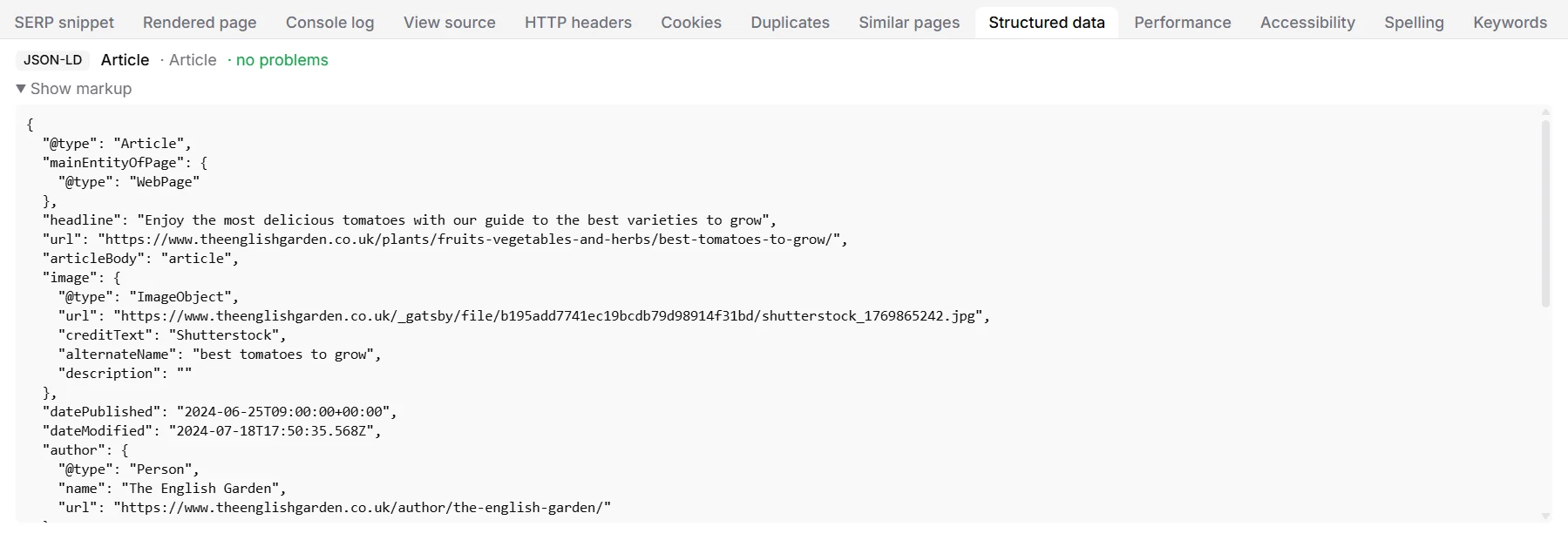
Select a page and open the Structured data tab. Each item shows its format, its type, which rich result it is for and its problems, if any. Show markup reveals the data as BumbleCrawl read it.
Across the site
The Structured data tab of the table lists every page with its items and problems. In Health, problems are counted per check: broken JSON-LD, invalid schema.org markup, incomplete or improvable rich result markup, and indexable pages without any structured data.
Structured data usually comes from templates. Fix the template behind one page and all pages built with it are fixed too: sort the list by URL to see which page types are affected.