Security checks
HTTPS, mixed content, insecure forms and the security headers every page should send.
What is checked
Browsers warn visitors about insecure pages, and Google prefers secure sites. The Security tab and the security section of Health cover the basics every page should get right:
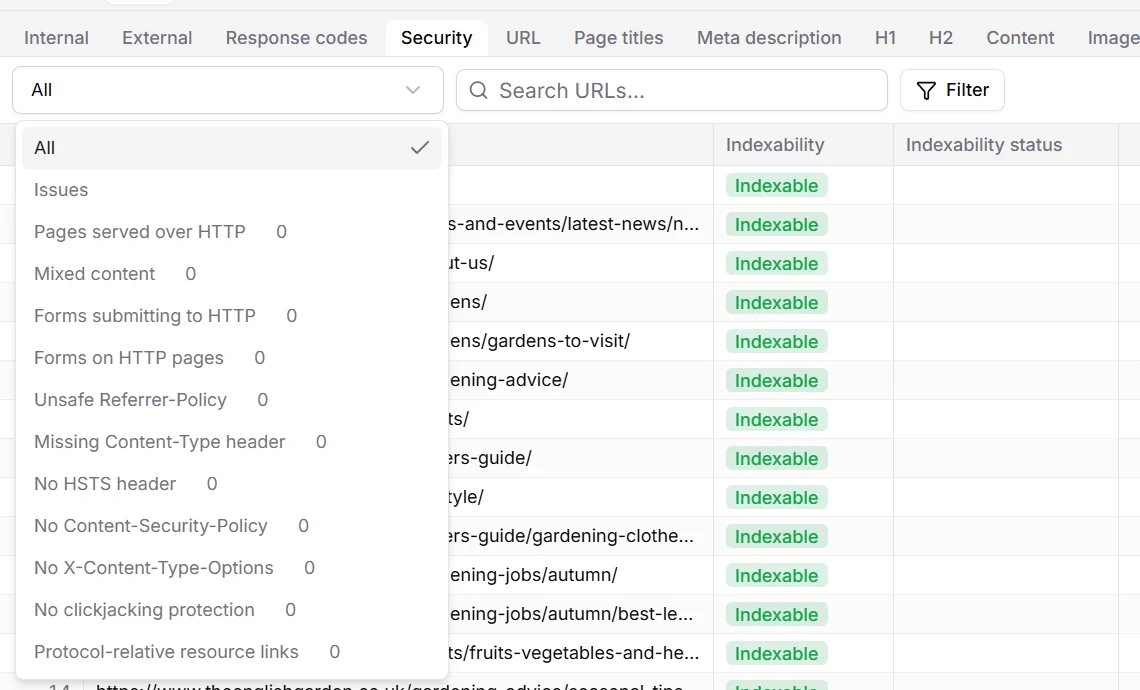
- Pages served over HTTP
- Pages that load without encryption. Redirect them to HTTPS.
- Mixed content
- HTTPS pages that load scripts, styles or images over HTTP. Browsers block or flag them.
- Forms submitting to HTTP, forms on HTTP pages
- What visitors type in would travel unencrypted.
- No HSTS header
- Without Strict-Transport-Security, a browser may still try HTTP first, which attackers can intercept.
- No Content-Security-Policy
- The policy limits where scripts may come from, which blunts most script injection attacks.
- No X-Content-Type-Options, missing Content-Type
- Without them, browsers guess what a file is, which can turn an upload into a script.
- No clickjacking protection
- Without X-Frame-Options or a frame-ancestors policy, other sites can show yours in a frame and trick visitors into clicks.
- Unsafe Referrer-Policy
- A policy that sends full addresses, including parameters, to other sites.
- Protocol-relative resource links
- Links like //cdn.example.com/script.js, which load over HTTP on HTTP pages.
Security headers are usually set once for the whole server, so a missing header tends to affect every page. Ask whoever runs the server or hosting; the fix is a few lines of configuration.