Redirects, canonicals and hreflang
Redirect chains and loops, canonical conflicts and chains, and hreflang errors on multilingual sites.
Redirects
The Response codes tab lists every URL with its status. Its filter list separates permanent (301, 308) from temporary (302, 303, 307) redirects, and shows meta refresh and JavaScript redirects, which search engines handle less reliably.
After the crawl, BumbleCrawl follows every redirect to its end and reports:
- Redirect chains
- A redirect to a URL that redirects again. Each hop costs time and some link value; redirect straight to the final URL.
- Redirect loops
- Redirects that end where they started. The page can never load.
- Internal redirects
- Your own links that point to a redirect. Update the link to the final URL.
- Broken links
- Links to URLs that answer with 4xx or 5xx, internal and external.
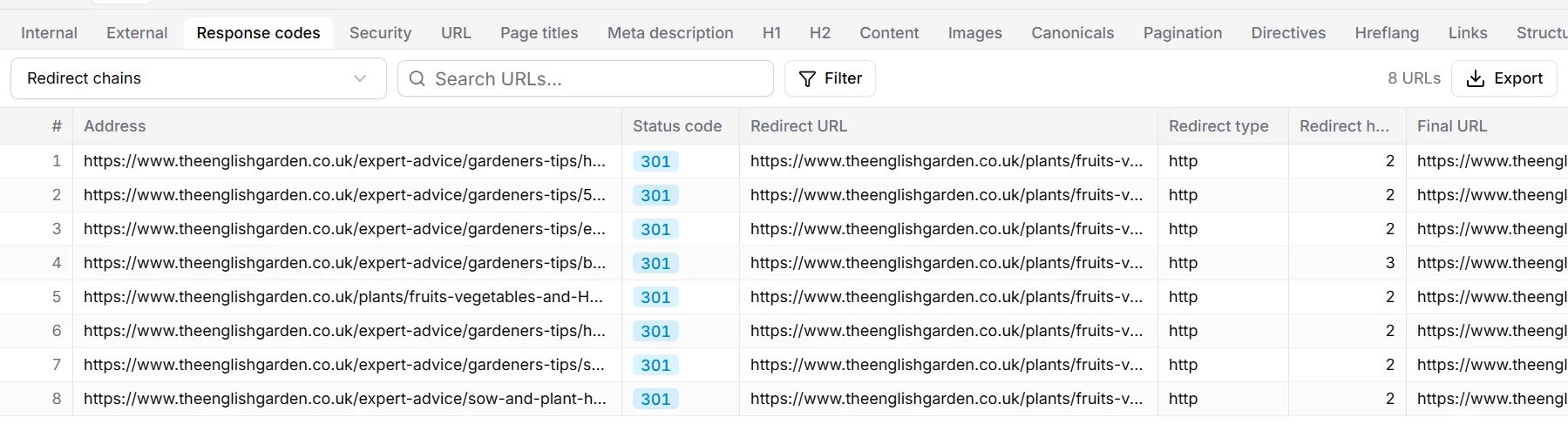
To fix links that point to redirects, open a redirecting URL and the Inlinks tab: it lists every page that links to it. Export › Broken links with their sources… gives you the same for all broken links at once.
Canonicals
A canonical tells search engines which address is the original when the same content exists under several URLs. The Canonicals tab shows each page's canonical, and the checks catch the mistakes that make search engines ignore it:
- Conflicting canonicals: the HTML and the HTTP header, or two tags, name different URLs.
- Canonicals pointing to a non-indexable URL, or to a page that is itself canonicalised to another (a chain).
- Canonical targets that no link leads to.
- Relative URLs, #fragments, invalid attributes, and canonicals outside the <head>.
- Pages without a canonical, and how many pages are canonicalised to another URL.
By default BumbleCrawl also crawls canonical URLs that no link leads to, so it can check their status.
Hreflang
Sites in several languages or countries tell search engines which version is for whom with hreflang links. The rules are strict, and mistakes are common. The Hreflang tab lists the hreflang links of every page, and the checks report:
- Missing return links: page A names page B as its English version, but B doesn't name A back.
- Invalid language or region codes (such as en-UK instead of en-GB), and the same code used twice.
- Hreflang links to broken, redirected, canonicalised or noindex URLs.
- Inconsistent language codes: two pages declare different codes for the same page.
- Missing self-references and missing x-default.
Where hreflang is read
BumbleCrawl reads the hreflang links in each page's HTML and, by default, crawls the URLs they point to. If your site declares hreflang only in XML sitemaps or HTTP headers, the hreflang checks have nothing to compare.